
Table of Contents “IoT devices” is one of the most familiar terms in the tech world today. From the smartwatch on your wrist to
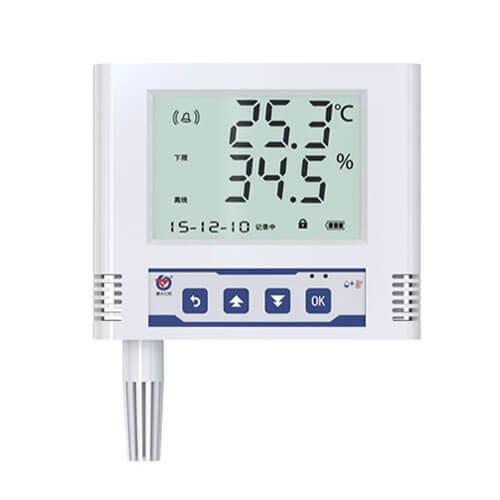
Ethernet Temperature Humidity Data Logger
Our industrial-grade Ethernet temperature humidity data logger uploads collected temperature and humidity data to a server via Ethernet. It supports communication over local area networks (LANs), wide area networks (WANs) across gateways, and Dynamic DNS (DDNS).
- Model: RS-WS-ETH-6-*-T
- MOQ: 1 PCS
- Delivery date: within 24 hours
- Price: $53.5~$71.3
About - Ethernet Temperature Humidity Data Logger
Our Ethernet temperature humidity data logger makes full use of existing Ethernet communication networks for long-distance data collection and transmission, enabling centralized monitoring of temperature and humidity data. It features a large LCD display and upper and lower temperature and humidity limits that can be customized by the user. Both temperature and humidity can be calibrated with password protection. The built-in alarm module, with a buzzer or relay, provides alarm notifications when preset limits are exceeded. The data logger offers high accuracy and strong resistance to electromagnetic interference. Our Ethernet temperature and humidity data logger is widely used in computer rooms, security systems, hospitals, power monitoring rooms, smart homes, and other applications.
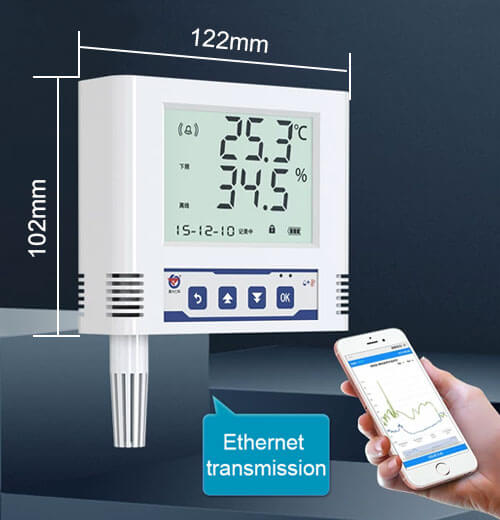
RS-WS-ETH-6-*-T features
- It is available with two probe options: an external probe and an extended probe, with the extended probe cable available in lengths of up to 30 meters.
- Data is uploaded via Ethernet, supporting communication within a LAN, WAN communication across gateways, and Dynamic DNS (DDNS).
- The data logger can be configured through its Ethernet port for simple and convenient setup.
- The temperature and humidity sampling interval is 2 seconds, while the data upload interval can be set from 5 to 10,000 seconds.
- The built-in alarm function allows users to set upper and lower alarm limits and hysteresis values.
- It features two normally open contacts that can be freely assigned to different alarm events.
- A built-in buzzer provides local audible alarms, while an external audible and visual alarm can also be connected as an optional accessory.
RS-WS-ETH-6-*-T parameters
| Power supply | DC 7~30V |
|---|---|
| Power consumption | 0.7W |
| Communication interface | RJ45 Ethernet port, TCP data upload (supports static IP address, DHCP IP address auto-acquisition, cross-gateway support, DNS domain name resolution) |
| Operating environment | -20℃~+60℃, 0%RH~95%RH (non-condensing) |
| Measuring range | -40℃~+80℃, 0%RH~100%RH |
| Accuracy | ±0.5℃(25℃), ±3%RH(60%RH, 25℃) |
| Resolution | 0.1℃, 0.1%RH |
| Data refresh time | 1s |
| Long-term stability | Temperature ≤0.1℃/y, Humidity ≤1%RH/y |
| Response time | Temperature ≤25s (1m/s wind speed²), Humidity ≤8s (1m/s wind speed²) |
| Data upload time | Default 5s/time (1s~10000s adjustable) |
| Internal storage | Recording period: 1min-24h adjustable, Recording capacity: 65000 records |
RS-WS-ETH-Y*-T features
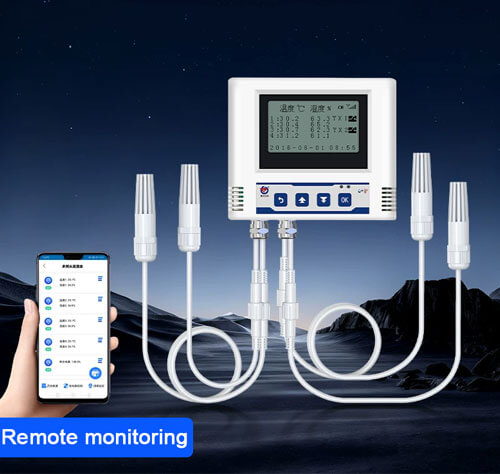
- The RS-WS-ETH-Y*-T series is a multi-channel Ethernet temperature humidity data logger available with two, three, or four probes. Probe cables can be up to 30 meters long.
- Data is uploaded via Ethernet, supporting communication within a LAN, WAN communication across gateways, and Dynamic DNS (DDNS).
- The default temperature and humidity sampling interval is 2 seconds, while the data upload interval can be configured from 1 to 10,000 seconds.
- The data logger features built-in data storage and automatically stores data when offline, with each channel capable of storing up to 16,000 records.
- It also features a built-in alarm function, allowing users to set upper and lower alarm limits and hysteresis values.
RS-WS-ETH-Y*-T parameters
| Power supply | 7~30V DC |
|---|---|
| Average power consumption | 0.75W |
| Communication interface | RJ45 Ethernet Port |
| IP address | Supports static IP address, automatic IP address acquisition, cross-gateway access, domain name resolution, and WAN connectivity. |
| Operating environment | -20℃~+60℃, 0%RH~95%RH (non-condensing) |
| Measuring range | -40℃~+80℃ (-40℃~+120℃ optional), 0%RH-100%RH |
| Accuracy | ±0.5℃ (25℃), ±3%RH (60%RH, 25℃) |
| Resolution | 0.1℃, 0.1%RH |
| Data refresh time | 1s |
| Number of probes | 2~4 channels (default 4 channels) |
| Long-term stability | Temperature ≤0.1℃/y, Humidity ≤1%RH/y |
| Response time | Temperature ≤25s (1m/s wind speed²), Humidity ≤8s (1m/s wind speed²) |
| Data upload time | Default 2s/upload, 1s~1000s adjustable |
FAQs - Temperature Humidity Data Logger
Which is better for industrial temperature monitoring, Ethernet or WiFi?
There is no absolute “better,” only “more suitable for the scenario.” Industrial temperature monitoring must prioritize data accuracy and real-time performance. In core production areas, high-interference environments (such as metal warehouses, near frequency converters), or when closed-loop control is required, Ethernet is significantly superior to WiFi. However, in environments where cabling is difficult, temporary deployments are needed, or mobile deployments are required, WiFi data logger has a greater advantage.
How do I connect an Ethernet temperature humidity data logger to my network?
First, power on the device and connect it to the configuration computer using an Ethernet cable. Double-click to open the configuration software RSETH-DXT-XV32. Click the search button to find and display all Ethernet temperature humidity data loggers on the local area network in the list. Double-click the device you want to add in the list to update its network parameters in the network tab on the right. If multiple devices are found, you can select them by double-clicking different devices in the list. The information prompt area will then indicate whether the operation is normal or indicate that an operation is in progress.
How do I configure an Ethernet temperature humidity data logger?
Click the “Read Device Parameters” button to read the device parameters into the interface. After modifying the device parameters, click the “Configure Device Parameters” button to download the parameters to the device.
- Server Quantity: The default value is 8; no modification is needed.
- Terminal Address: The unique identifier of the device, which must be an 8-bit address. The monitoring platform will use this address to distinguish devices.
- Login Frame Interval: The interval between device uploads login frames, default 3 seconds.
- Heartbeat Interval: The interval between heartbeat data frames uploaded by the device, generally using the default value of 60; users should not change this arbitrarily.
- Active Upload Frame Interval: The interval between active upload frames, default 5 seconds. The larger the value, the slower the data refresh; the default value is generally sufficient.
- Working Mode: For Ethernet temperature humidity data logger series products, “Temperature and Humidity Probe” should be selected here.
- 485 Port Baud Rate: Invalid here.
- MODBUS Parameters: Data collected by this series of products is uploaded through channel 1; therefore, the upper and lower limits of temperature and humidity on channel 1 are effective. Other parameters are invalid.
Will data be lost when the network is down?
No, our Ethernet temperature humidity data logger has a resume function. When the network is down, the device will automatically cache the measurement data locally, and the device will automatically upload the data to the server once the network is restored.
How can an Ethernet temperature humidity data logger be used to achieve automatic control?
Our data logger can be connected to an external relay for dual control of temperature and humidity at both upper and lower limits. When the temperature reaches the lower alarm limit, the heater is automatically activated to heat the system. When the temperature reaches the upper alarm limit, the cooler is automatically activated to cool the system.
How to install an Ethernet temperature humidity data logger?
To facilitate on-site construction, our company offers two installation methods:
- Hoist hole installation: Drive self-tapping screws and expansion screws into the fixed position on the wall, then hang the device via the hoist hole.
- Wall-mounted hook installation: Install one side of the hook to the wall using countersunk screws, and the other side to the device using screws. Then hang the two parts together.
Other Temperature Data Loggers
Related Blogs
Table of Contents Temperature and humidity sensors are among the most basic sensing devices widely used in commercial, industrial, and residential setups. Traditionally, temperature
Table of Contents In the fields of electrical engineering and electronics, we frequently encounter various analog signals such as voltage and current. In nature,
Table of Contents What are wireless sensors? Wireless sensors are miniature electronic devices that integrate sensing, data processing, and wireless communication functions. They are
Table of Contents In your daily life and work, have you ever felt troubled by unsuitable temperature or humidity levels? Whether you’re an engineer
Table of Contents Temperature and humidity data loggers are widely used in various industries across the country, such as agricultural research, food safety, pharmaceutical
Table of Contents Smart buildings are the product of the development of modern science. The smart building system is mainly composed of Internet of